
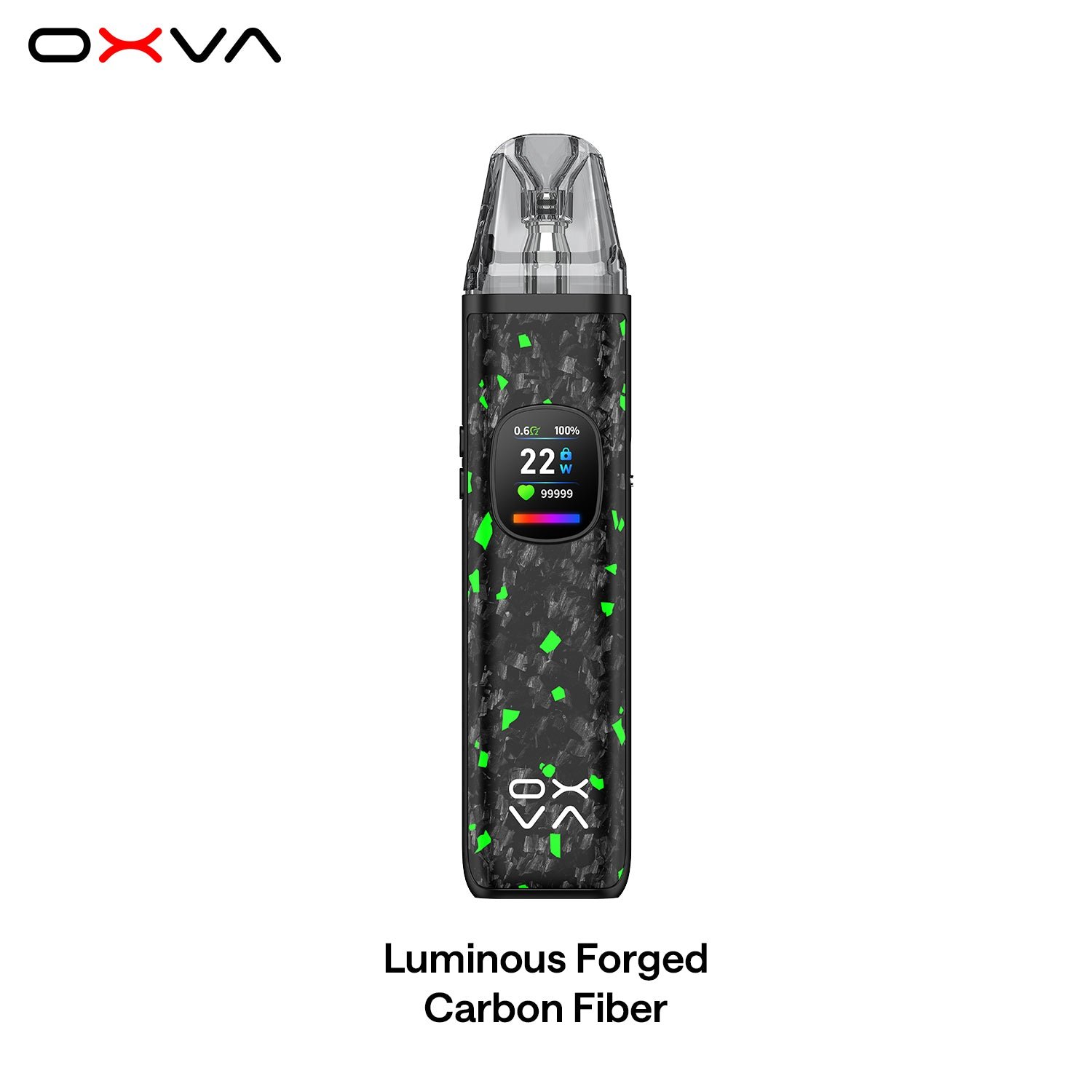

Description
OXVA XLIM Pro 2 Kit (DNA Version) , powered by the cutting-edge OXVA x EVOLV DNA chip, XLIM PRO 2 DNA delivers precise temperature control and replay technology for a smooth, intelligent, and truly effortless vaping experience.MaterialZinc Alloy+Carbon fiber/IML+PCTGDimension114.5*25*15mmRefillTop RefillCartridge Capacity2mlOXVA XLIM Pro 2 DNA Cartridge0.6Ω /0.8Ω /1.2ΩResistance Range0.2-3.0ΩBattery1300mAh, Type-C, 5V/2AOutput Power5-30WDisplay Screen0.56” HD Color ScreenPackage includes· 1 × OXVA XLIM Pro 2 Device (DNA Version)· 1 × 0.6 Ω Top Fill Cartridge SS· 1 × 0.8 Ω Top Fill Cartridge SS· 1 × Type-C Cable· 1 × User Manual· 1 × Lanyard· 1x User Manual· 1x Quick User Guide Features:1. Never Dry Hit – No More Burnt Hits!Smart temperature control prevents dry hits, even when e-liquid is low or without e-liquid.EVOLV DNA Chip inside for next-level safety and performance. Your browser does not support the video tag. 2.Never Flavor Fade – Consistent Taste, Even at Low Battery!Stainless Steel coils maintain perfect temperature, ensuring a pure and never-fading flavor.30% longer-lasting pods. More time to enjoy. More satisfaction in every draw.Smart output, stable flavor — even when the battery runs low. 3.Smart Flavor Replay – Your Flavor, On Demand!AI adjusts 30,000 times per second for precision flavor tuning.One-click memory lets you replay your favorite puff anytime—hit it just the way you like it! ✅FAQ – XLIM Pro 2 DNA ✅1. How do I operate the buttons? Press the replay button and function button at the same time ffor 2s Long press the replay button for 2s Press the function button 2 times in 1.5s to switch light effects Press the function button 3 times in 2s to adjust the wattagee e Press the function button 4 times in 2s to lock/unlock the buutton fire Press the function button 6 times in 2.5s to swith the language Press the function button 7 times in 2.5s to reset puffs✅2. How to set the flavor replay1. During the vaping process with the XLIM stainless steel coil cartridIges, if you find the taste of the last puffsatisfying, you can click the REPLAY button 1 time. The device will automatically follow the output curve of the lastpuff to ensure a consistent flavor experience.2. Click the REPLAY button 2 times to cancel flavor replay.3. If you remove the cartridge and insert it again 0.8 seconds later, it wdetected as a new cartridge, and youneed to reset it.✅3. How to get Anti-BurnWhen paired with XLIM stainless steel coil cartridges, the XLIM P!RO 2 DNA version is equipped with a function toprevent the cartridge from dry burning when there is no e-liquid or insufficient e-liquid.✅4. The device won’t turn on or off1. Please press the replay button and function button at the saame time for 2s to turn on/turn off the device.2. The device will automatically power off after 36 hours of non-use toconserve battery life. Please turn it on forfurther use.3. If the device shows fully charged when plugged in but still cannot be turned on afterward, there may be aproblem with the device.4. Please contact the OXVA support team for assistance.✅5. How to switch the language?1. Press the function button 6 times for 2.5 seconds to enter the switching mode2. Press the function button 1 time to select the language.3. After selecting the needed language, wait for the text tostop flashing, and the switch will be successful.✅6.The LED light does not light up1. Press the function button 2 times for 1.5 seconds to switchthe light effect.2. If there is still no display after pressing the button twice, itis considered a malfunction.3. Please contact the OXVA support team for assistance.✅7. Does the SS and top-fill cartridges compatible with Pro 2 DNA?1. The XLIM TOP FILL cartridge can be used on the XLIM PRO2 DNA, but it does not support the anti-burn function.2. The SS cartridge is not recommended for use on non-DNA devicesas it may cause resistance jumping and powermismatch issues.3. The SS cartridge is only compatible with DNA devices.


Reviews
There are no reviews yet.